Gonanku
A personal archive that helps me find files again without remembering their exact name or folder.
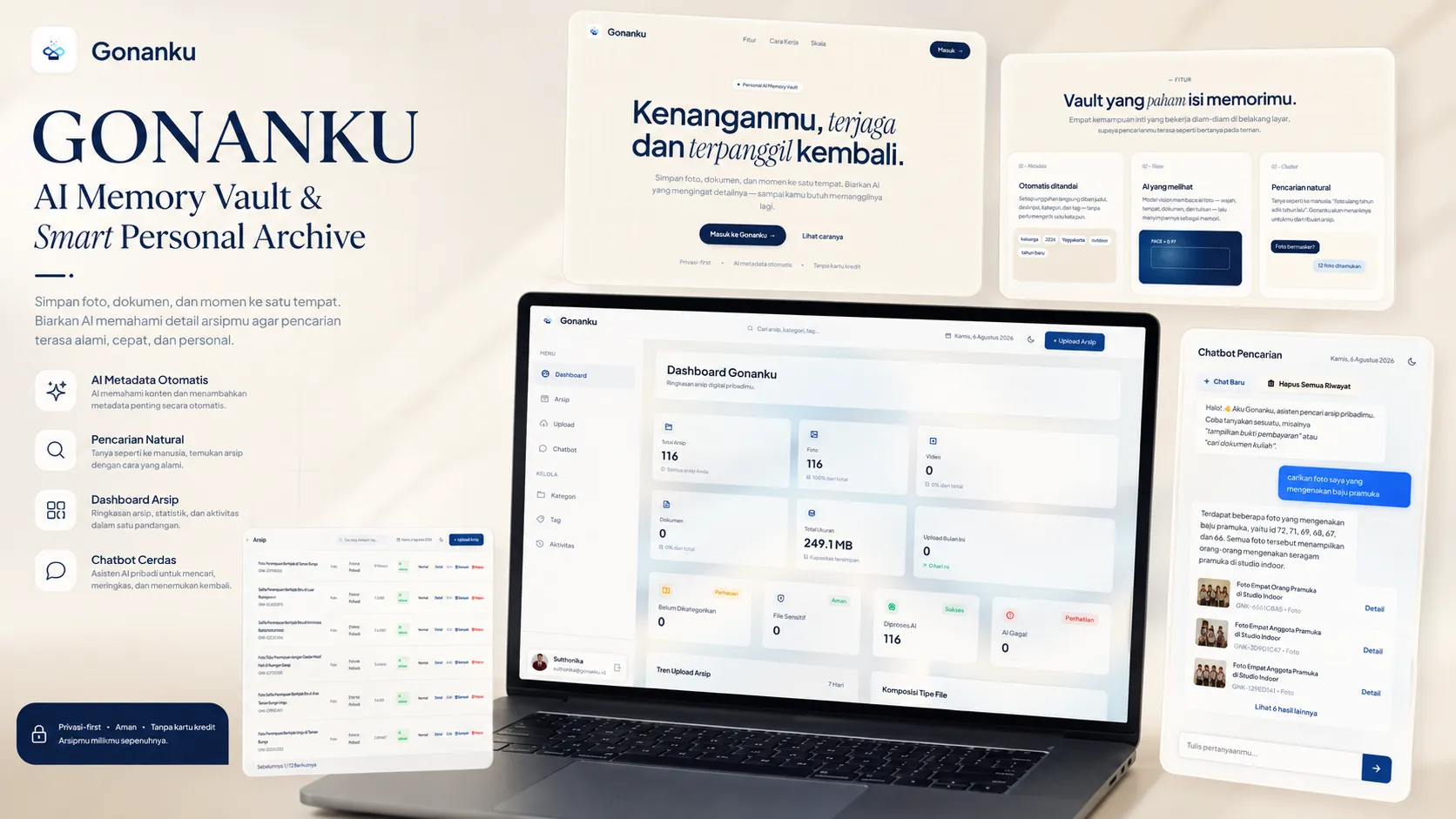
Gonanku is a web application for storing and organizing personal documents, photos, screenshots, audio, and other files. As files are added, the system creates information that makes them easier to retrieve later through the dashboard or natural-language search.
The Problem
I often save important files in different places.
Some end up in the gallery, messaging apps, download folders, laptops, or temporary folders created for a specific task.
The problem appears later, when I need one of those files again.
A filename such as IMG_20250601.jpg does not tell me much several months later. I may remember what was inside the file but no longer remember its name or where I stored it.
That was the problem Gonanku started from.
What I Built
Gonanku brings file storage, organization, and retrieval into one web application.
Users upload files normally. The original files are stored separately, while the application keeps the information needed to organize and find them.
After upload, AI helps generate a title, category, tags, and summary. Those details can later be used when browsing the archive or searching through the chatbot.
The Storage Decision
I did not store the original files directly in the application database.
Cloud SQL stores the information the application needs to search and manage, while the original files are kept separately through a private Telegram channel.
This keeps the database focused on searchable information instead of carrying large file binaries.
This separation became one of the main structural decisions in the project.
From Upload to Findable Archive
For me, an upload is not finished just because the file was stored successfully.
I wanted each file to carry enough information to make it useful several months later.
After a file is received, Gonanku records its basic information and processes available content. AI then helps create a title, category, tags, and summary.
That metadata becomes part of the archive and can be used again during search.
Finding Files Without Remembering the Filename
I did not want search to depend on users remembering the exact filename.
Someone can instead search using what they remember about the file.
The system interprets the request and searches records that actually exist in the archive.
Search can relax filters and use broader matching when an exact query returns nothing. AI can also help compare the request with metadata already stored for candidate files.
Key Decisions
AI failure should not stop the upload
I treated file storage and AI processing as separate steps. A file that has already been stored should remain available even when the AI service fails. The AI processing status can be recorded separately, allowing metadata to be processed again later.
Search starts from actual archive data
I did not use the LLM as a memory of the user's files. The application searches stored records first. AI helps interpret the request and compare possible results. A basic local fallback also keeps simple search available when the external AI service is unavailable.
The cloud setup stayed proportional to the project
Gonanku is a personal archive, not a large public storage platform. I kept the infrastructure limited to what the project actually needed instead of adding services such as Kubernetes, Pub/Sub, load balancing, or a vector database. For this scope, Cloud Run and Cloud SQL were enough.
My Contribution
Gonanku was a solo project, so I worked across the full product flow.
Product Scope
Defined the core problem, MVP requirements, and features that did not need to be built.
System Design
Separated file storage, searchable metadata, AI processing, and the web application into clear responsibilities.
AI Integration
Built the metadata generation and natural-language retrieval flow.
Full-Stack Development
Implemented file upload, archive management, dashboard, search, authentication, and supporting backend services.
Cloud Deployment
Prepared and deployed the application using Docker, Cloud Run, and Cloud SQL.
What I Delivered
Gonanku reached the working web application stage. The application includes file upload, metadata management, archive browsing, soft delete and restore, dashboard monitoring, AI-generated metadata, chatbot search, and activity tracking.
The result I care about most is not the number of features. Files that originally had little more than a filename and storage location can now carry additional context that helps make them easier to find later.
Gonanku Overview Dashboard
Main interface for viewing personal archive stats, recent uploads, and quick search.
What Is Still Unproven
Gonanku is a personal academic project.
I have not measured how much time it actually saves compared with searching for files manually.
The current prototype also does not prove how the architecture would behave with a much larger archive or a public multi-user workload.
Using Telegram as file storage was a prototype decision. A production system with stricter requirements around compliance, storage control, access policies, and service guarantees would need to revisit that choice.
What I Learned
This project made me separate two problems that initially looked the same: storing information and being able to find it again.
A file can be stored correctly and still be difficult to use when there is not enough context around it.
I also learned to keep AI in the parts of the system where interpretation is useful, such as generating metadata and understanding search requests.
Basic operations such as storing files, opening the archive, and keeping saved records available should not depend entirely on an AI service.
Technology
Key Outcomes
Files Carry More Context
Uploads can receive titles, categories, tags, and summaries that help with retrieval later.
Search Without Exact Filenames
Users can search based on what they remember about a file instead of knowing its original filename.
The Archive Still Works Without AI
AI processing can fail without blocking the core file-storage workflow.